


Treinta - Gestiona tu negocio
4.5750.00 Reviews
App Specs
- Version
- 2.70.17
- Updated On
- License
- Free
- Downloads
- 10,000,000+
- Developer
- Treinta
- Categories
- Finance
- Platform
- Android
Screenshots

 Analysis by AppCompare
Hey there, app enthusiasts! Today, I’m diving into an app that’s been making waves, especially among small business owners—Treinta. If you're in the United States and looking to streamline your business finances, this app might just be the game-changer you've been waiting for. Let’s see what makes it tick and whether it’s worth your time!
Who benefits most from a simple business ledger?
I’d consider Treinta most useful for an owner who handles sales personally and wants a clearer record of money moving through a small operation. A market seller, home-based business, or neighborhood shop may not need the complexity of accounting software built for a finance department. A phone-first tool can make it easier to record activity close to when it happens, rather than relying on memory at the end of a hectic day.
That simplicity has a trade-off. Recording a transaction in an app is not the same as having a complete accounting system, and a neat dashboard does not automatically make a business tax-ready. I would treat Treinta as a practical place to keep everyday records, not as a substitute for professional advice or a more specialized system when reporting requirements become demanding.
The app is free to download, with in-app purchases ranging from $0.99 to $179.91 per item. I’d check what a purchase covers before committing, especially if I were testing it for a business with a tight budget. Its Everyone content rating makes it broadly accessible, but that rating is not a statement about financial suitability or how the app handles business data.
A useful routine for busy selling days
Imagine running a small stall and moving between serving customers, restocking, and paying for supplies. The practical value of a sales-and-expense tracker is being able to note a sale when there is a quiet moment, then record a supply purchase before the receipt disappears into a pocket. Later, those entries can help make the day’s activity easier to review than a collection of scraps or a half-filled notebook.
For inventory, I’d use any stock alerts as prompts to check shelves, not as a replacement for a physical count. A damaged item, a return, or a sale that was never entered can make the digital picture drift from reality. A quick count at a regular point in the week is a sensible companion to app records, particularly for products that sell quickly.
There is also a useful habit hidden in the ordinary workflow: decide on a consistent way to label expense categories before entering lots of transactions. If similar purchases are filed differently, later reports become harder to interpret. I would start with a few clear categories that match how the business actually spends, then keep using them rather than trying to make every entry unusually precise.
Worth Reading Before You Choose

EA SPORTS FC Mobile 26 Is a Bigger Football Game, but It Takes Time

Flipboard Shows What News Apps Must Do Beyond the Feed

Switching to Android Auto Means Rethinking Your Driving Routine

Google Calendar Makes a Crowded Week Easier to Manage

Ludo King Makes the Most of the Minutes Between Plans

Baby Panda World Brings Quick Play to Modern Phones, but Its Game Library Feels Busy
What to check before trusting a finance app
Because Treinta deals with business finances, I would take a moment to review the permissions it requests and the choices presented during setup. Only grant access that makes sense for the task I want to use, and pause if a request is unclear. I would also look through the app’s privacy information and account settings before adding sensitive business details. I can’t infer specific permissions or data practices from the app’s general description, so checking those screens directly is the careful approach.
My own rule for any phone-based financial record is to enter only what I need for the workflow, protect access to the device, and avoid treating an app as the sole copy of important records. Keeping a separate record or periodically exporting information, if that option is available, can reduce the disruption of losing access to a device or account. Before depending on a particular backup or export method, I’d confirm it is actually offered in the version I’m using.
Treinta is made by Treinta, and its finance focus is aimed at managing small-business activity rather than personal budgeting alone. The app has a 4.8 average from around 99,000 ratings, with over 5 million installs. That level of adoption can be reassuring when deciding whether a product is worth examining, but it doesn’t tell me whether its controls fit my own business or whether I should enter sensitive information without checking how the app works.
What is Treinta?
Alright, let’s kick things off with what Treinta is all about. Essentially, it’s a financial management app designed to help small businesses keep track of their finances in a simple and efficient way. Think of it as having a pocket-sized accountant who’s always got your back.
The app is pretty intuitive and offers features that cater specifically to the needs of entrepreneurs who don’t have the resources to hire a full-time financial team. From tracking sales to managing expenses, Treinta aims to provide a comprehensive solution all within one platform.
First Impressions
When I first opened up Treinta, I was immediately impressed by its clean interface. It’s not cluttered with unnecessary features, which is a big plus for those of us who aren’t particularly tech-savvy. The app’s design is straightforward, which makes navigating through it a breeze.
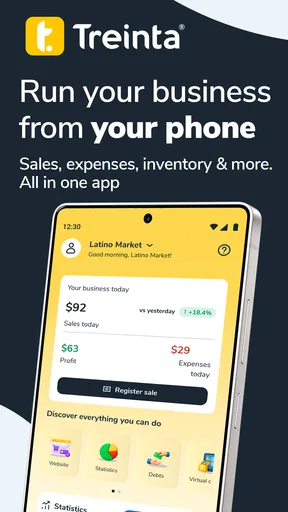
After a quick sign-up process, you’re welcomed with a dashboard that highlights your financial status. It’s a very user-friendly experience, and I appreciated how it didn’t overwhelm me with too much info at once.
Features That Stand Out
Now, let’s get into the nitty-gritty of what Treinta offers. Here are some features that I found particularly useful:
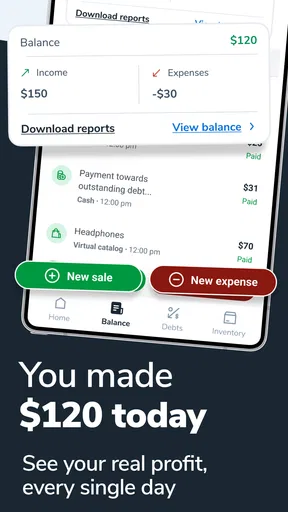
- Sales Tracking: This feature allows you to record and monitor your sales transactions in real-time. It’s great for those who want to keep a close eye on cash flow.
- Expense Management: Easily input your daily expenses, categorize them, and see where your money is going. This helps in budgeting and identifying unnecessary expenses.
- Inventory Management: If you’re dealing with products, this feature lets you track inventory levels. It even sends alerts when stock is running low, which is super handy.
Using Treinta in Real Life
So, how does all this translate into everyday use? For starters, the app is very responsive. I love that I can quickly add a sale or expense on the go. It’s perfect for those moments when you’re juggling multiple tasks and need to update your records promptly.
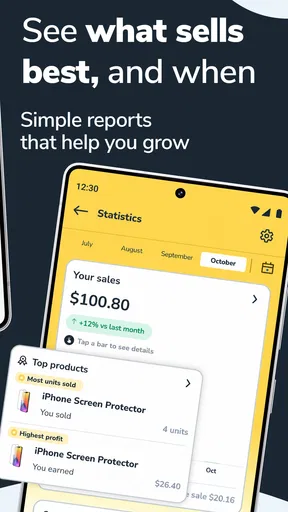
Another aspect I appreciate is the analytics feature. Treinta provides simple yet insightful reports that help you understand your business’s financial health. It’s like having a mini financial advisor whispering in your ear.
Room for Improvement
While Treinta is pretty solid, there are a couple of areas that could use some polish. For instance, the customer support is currently limited to email and FAQ sections. It would be great to see a live chat option or even a phone line for more immediate assistance.
Also, while the app is largely intuitive, new users might benefit from more comprehensive tutorials or onboarding guides. Some additional hand-holding could make the initial setup even smoother.
Choosing between Treinta and other tools
Compared with a paper ledger, Treinta offers a more immediate way to enter sales and expenses and review patterns, while a notebook remains flexible and needs no account or setup. A spreadsheet gives more control over columns and formulas, but it depends on the user maintaining the structure and checking calculations. I’d choose Treinta when quick phone entry and simple summaries matter more than customization.
On the other hand, a business that needs detailed bookkeeping, formal reports, or a workflow shared across several staff members may be better served by dedicated accounting software. Before switching from any existing system, I’d check whether records can be moved or exported in a useful format; re-entering months of transactions is a real cost that a friendly interface cannot erase.
Treinta supports Android 7.0 and later, and version 2.59.2 is the current release. I’d check compatibility on the device I plan to use, then spend a little time testing the key tasks—entering a sale, recording an expense, and reviewing a report—before making it central to the business routine. That small trial is a better test of fit than judging the app by its first screen.
Final Thoughts
In conclusion, Treinta is a powerful tool for small business owners looking to simplify their financial management. It’s packed with features that are both useful and easy to use. While there’s always room for improvement, the app’s current iteration is more than capable of helping you keep your business finances in check.
If you’re a small business owner in the United States, I’d definitely recommend giving Treinta a try. It might just be the financial partner you didn’t know you needed. Plus, with its user-friendly design, you’ll find yourself mastering it in no time. Happy managing!
My cautious recommendation
I’d try Treinta if I wanted a straightforward way to keep sales, expenses, and stock in view without starting with a complicated accounting package. I’d skip it if I needed advanced bookkeeping, dependable collaboration across a team, or a confirmed privacy and backup setup that I had not personally checked. The sensible approach is to begin with routine, non-sensitive entries, inspect the available account and privacy choices, and see whether the app’s reports answer the questions I actually have about the business.
Pros
- User-friendly interface for seamless navigation.
- Real-time financial tracking enhances accuracy.
- Offline mode available for uninterrupted use.
- Customizable financial reports for detailed insights.
- Secure data encryption for privacy protection.
Cons
- Limited integration with third-party apps.
- Customer support response can be slow.
- Advanced features require a subscription.
- Occasional bugs in the Android version.
- Limited language options besides English.
FAQs for Treinta - Gestiona tu negocio
What is Treinta and how does it work?
Treinta is a financial management app designed for small businesses and individuals to track their expenses, manage invoices, and handle transactions seamlessly. It offers a user-friendly interface where users can input their financial data, categorize expenses, and generate reports to better understand their financial health.
Is Treinta available for both Android and iOS devices?
Yes, Treinta is available for download on both Android and iOS platforms. Users can find it on the Google Play Store and the Apple App Store, ensuring accessibility across a wide range of smartphones and tablets, making it convenient for users to manage their finances on the go.
Does Treinta offer any integration with other financial tools or services?
Treinta supports integration with various financial tools and services, allowing users to sync their data seamlessly. This feature helps in maintaining accurate financial records across platforms, saving time and reducing the risk of errors in financial management.
Is my financial data safe with Treinta?
Treinta prioritizes user security by employing advanced encryption methods to protect your financial data. The app ensures that sensitive information is kept secure and confidential, complying with industry standards to provide peace of mind to its users regarding data safety.
Are there any costs associated with using Treinta?
Treinta offers a free version with basic features suitable for most users. However, there are premium plans available that provide additional features and tools for advanced financial management. Users can choose a plan that best fits their needs and budget.


